Security guard attendance registers on WhatsApp: what they cost
One operator pays a staff member from 05:30 to 15:00 to turn WhatsApp messages from twenty sites into a spreadsheet. What that register cannot show, and what replaces it.
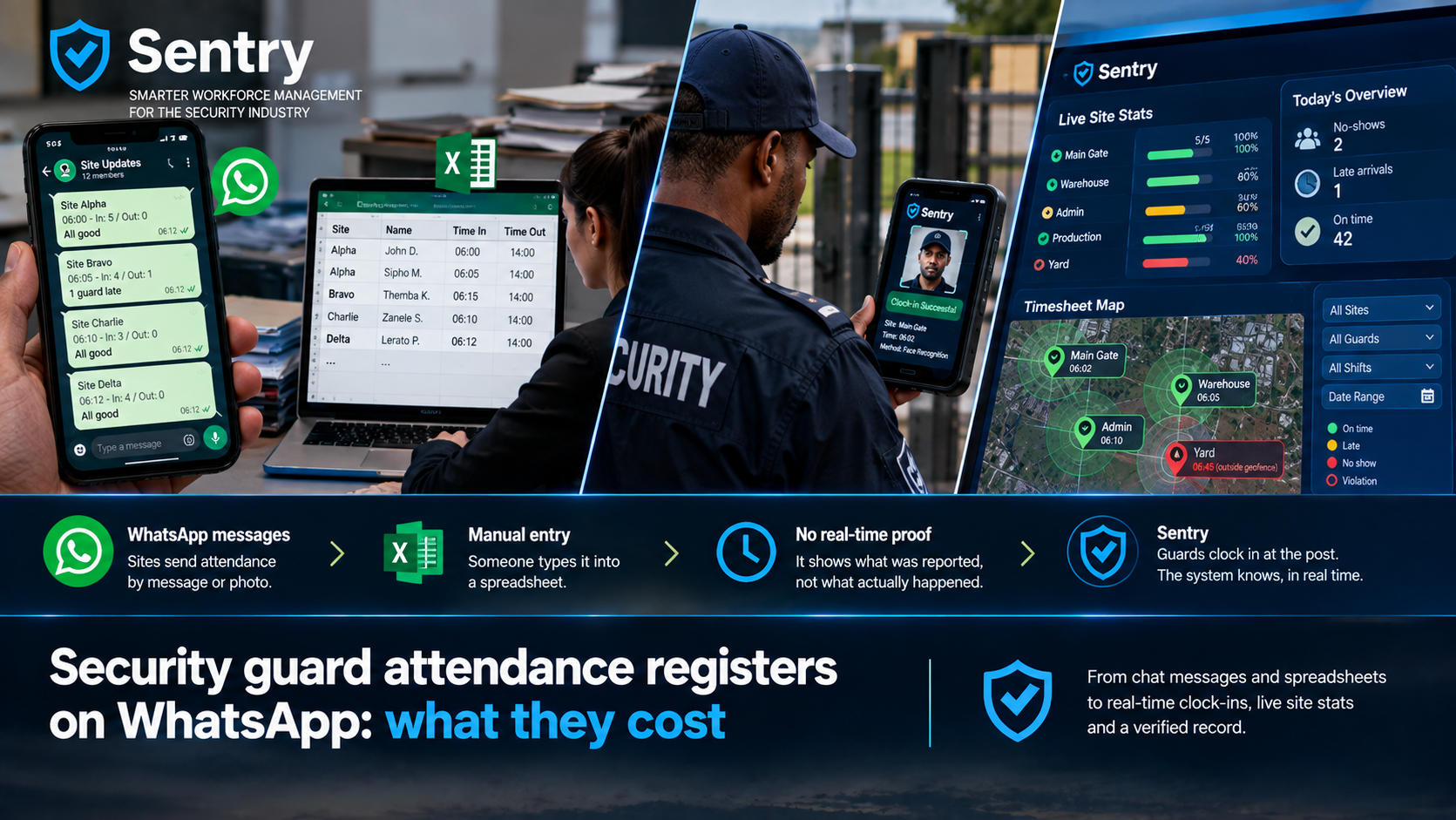
A security guard attendance register kept on WhatsApp works like this: at every shift change, each site sends a message or a photo saying who is there, and someone in the office types it into a spreadsheet. We have sat with more than ten South African security companies that run attendance this way, and none of them can prove from it that anyone was on site.
The method looks free because WhatsApp and Excel cost nothing. In practice it costs salaries, and the record it produces falls apart the first time a client questions an invoice.
How does a WhatsApp attendance register work in practice?
One national operator told us how their Gauteng branch does it. A single staff member is responsible for twenty sites on day shift, with about five guards on duty at each, so roughly a hundred people. She starts just before 05:30, when night shift ends and day shift begins. Each site sends a WhatsApp saying who clocked out and who clocked in. When a site does not send one, she phones it and asks who is actually there. She types the answers into Excel, and that takes her until about 15:00. When night shift starts, a second person does the same thing. Every province has its own team doing this.
Another company we spoke to runs two administrators, one for day shift and one for night. At the start and end of every shift, the site commander photographs the guards on duty, then photographs each guard's PSIRA card. The administrators match the faces to the cards and work out who is on site and who is not.
Both companies take the work seriously and put real people on it. The trouble is what the method can and cannot show.
What can a WhatsApp attendance register not prove?
Where the guard was
A message listing two names as on duty was typed somewhere. Nothing in it says that the sender, or either guard, was standing at the site.
When the guard arrived
The time on the message is when someone sent it, not when anyone arrived. If a message at 06:15 lists a guard who actually walked in at 07:10, the register shows them on time and nothing in the chat says otherwise.
Who was actually there
A photo of a PSIRA card proves the card exists. It does not prove that its owner is the person at the post. This is how buddy clocking works: one guard covers for another who never arrived, and the card photo looks the same either way.
Whether anyone checked
The register is only as reliable as the one person who sends it, usually the site commander. If they are covering for someone, nothing further down the chain will show it.
So when a client disputes an invoice, the evidence you have is a chat history and a spreadsheet typed from it.
What does it cost to run attendance this way?
The salary is the cost you can see. In the first example, one person spends from 05:30 to about 15:00 on day shift attendance for twenty sites, and another person covers night shift. Across several provinces, that adds up to a small department whose only job is copying messages into a spreadsheet.
The larger cost is the no-show nobody reported. If a site does not send its message and the phone call is never made, or the answer on the phone is wrong, the post stands empty and the office does not know. Often the first person to notice is the client.
The spreadsheet then feeds payroll and the invoice, so every typing error ends up in both.
What does a verified security guard attendance register look like?
The register should be created when each guard clocks in, rather than typed up afterwards from reports.
With Sentry Roll-Call, guards clock in on the handset that stays at the post. The handset works out which site it is at, and the guard proves who they are by employee number, NFC card, ID barcode or face recognition. The time recorded is the time they clocked in. If there is no signal, the clock-in waits on the handset with its original time and is sent when signal returns.
When we show this to companies that run WhatsApp registers, the clock-in is what they notice first. The guard is on the register the moment they clock in, and nobody in the office typed anything.
How does the office see who is on site right now?
The Live Site Stats page lists every site with the number of guards on duty against the number scheduled for day and night shift, as a percentage. Each site is coloured on a scale from Full down to Critical, the page refreshes every 30 seconds, and a filter narrows it to understaffed sites. The dashboard alongside it counts the day's no-shows and late arrivals against the roster.
That is the job the clerk was doing from 05:30, except it happens as guards clock in, for every site at once. A site that has gone quiet shows up as understaffed instead of waiting for someone to phone it.
Can you see where a guard actually clocked in?
The Timesheet Map plots every clock-in and clock-out on a map, with each site's boundary drawn as a circle. A clock-in or clock-out outside the boundary is marked in red as a violation, and a filter shows only those. You can narrow the map by site, guard, shift and date range, and export it.
This is usually the part of the demo people find hardest to believe. A spreadsheet can say a guard was on site, while the map shows where the handset was when they clocked in.
For more on what counts as proof when a client challenges attendance, read how to prove a guard was on site.
Where to go from here
If your attendance register is a WhatsApp group and a spreadsheet, Sentry time and attendance shows how clock-ins become timesheets and the timesheets become the invoice, without anyone retyping them.